 uyuyorumstore
um-chat
addMessage
addMessage API reference for um-chat
chat:addMessage
TriggerEvent('chat:addMessage', data)TriggerClientEvent('chat:addMessage', source, data)- data:
table(object)- template?:
string - args:
table | string - title?:
string - tag?:
table- name:
string - background?:
string
- name:
- template?:
Example (with template)
template is optional.
The purpose of using this is if you want to add your own special html elements, the html codes you write in the template will appear in the chat window.
And you must specify the variables you will use in the template in args and then you must write them in order, such as {0}, {1} will always start from zero because javascript.
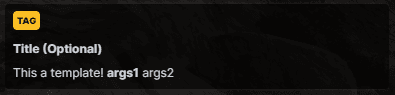
TriggerClientEvent('chat:addMessage', source, {
    template = '<div class="chat-message me">This a template! <b>{0}</b> {1}</div>', -- optional
    args = { 'args1', 'args2' },
    title = "Title (Optional)", -- optional
    tag = { -- optional
        name = "TAG",
        background = "#fbbf24" -- optional
    },
})

-- or you can use it like this

local data = {
    template = '<div class="chat-message me">This a template! <b>{0}</b> {1}</div>', -- optional
    args = { 'args1', 'args2' },
    title = "Title (Optional)", -- optional
    tag = { -- optional
        name = "TAG",
        background = "#fbbf24" -- optional
    },
}

TriggerClientEvent('chat:addMessage', source, data)
Example (with only args)
If there is no template and the args is a table, the first data will always be tag and will take the default tag colour.

TriggerClientEvent('chat:addMessage', source, {
    args = { 'System', 'Hello my friend' },
})
Now let's use an args as a string instead of a table and add tag, title.
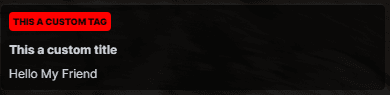
TriggerClientEvent('chat:addMessage', source, {
    args = 'Hello My Friend',
    title = 'This a custom title', -- optional
    tag = { -- optional
        name = "This a custom tag",
        background = "#ff0000" -- optional
    },
})